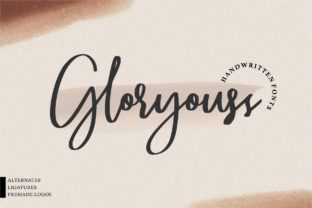
Gloryouss: A Bold Handwritten Font That Adds Character to Your Designs
If you're looking for a font that stands out and adds a personal touch to your design projects, Gloryouss is an excellent choice. This stunningly authentic handwritten font brings a bold feel that can elevate everything from logos and invitations to social media posts and branding materials. But like any design tool, using Gloryouss effectively requires some understanding of its strengths, limitations, and best practices.
What Makes Gloryouss Stand Out?
Gloryouss isn't just another handwriting font—it's a carefully crafted typeface that captures the essence of real handwriting while maintaining clarity and readability. Its bold style makes it ideal for headlines, banners, and other prominent text elements where impact matters. Whether you're designing for print or digital platforms, Gloryouss offers versatility and visual appeal without sacrificing legibility.
One of the key reasons people are drawn to Gloryouss is its ability to convey personality and authenticity. In a world where digital content often feels impersonal, a handwritten font like Gloryouss can help your designs feel more human and engaging. It's especially popular among creatives, entrepreneurs, and small business owners who want to add a unique flair to their work.
Common Mistakes When Using Gloryouss
While Gloryouss is a powerful tool, many users make mistakes that can reduce its effectiveness. Understanding these common pitfalls can help you avoid them and use the font to its full potential.
- Using Gloryouss for Long Text Blocks: One of the most frequent errors is applying Gloryouss to large blocks of body text. While it looks great in headlines and short phrases, it’s not designed for extended reading. This can lead to eye strain and a poor user experience.
- Ignoring Font Pairing: Gloryouss is bold and expressive, so pairing it with a complementary sans-serif or serif font can create a balanced design. Failing to do so can result in a cluttered or unprofessional look.
- Overlooking Licensing Restrictions: Many users don’t check the licensing terms before using Gloryouss in commercial projects. Some fonts are free for personal use only, while others require purchase or attribution. Always review the license agreement to avoid legal issues.
- Not Testing on Different Devices: Fonts can render differently across devices and screen sizes. What looks great on a high-resolution monitor might appear jagged or unclear on a mobile device. Testing your design on multiple platforms ensures consistency.
- Focusing Only on Aesthetics: While the visual appeal of Gloryouss is undeniable, it's important to consider how it aligns with your brand voice and message. A font should enhance communication, not distract from it.
How These Mistakes Can Affect Your Work
Making these mistakes can have real consequences. Poor font pairing or overuse can make your design look unprofessional, while ignoring licensing terms could lead to costly legal problems. Using Gloryouss inappropriately can also reduce the effectiveness of your message, making it harder for your audience to engage with your content.
Additionally, relying too heavily on one font without considering contrast or balance can make your design feel cramped or overwhelming. This is especially true when working with digital content, where readability is crucial for user retention and engagement.
Practical Tips for Using Gloryouss Effectively
To get the most out of Gloryouss, follow these practical tips:
- Use It Strategically: Save Gloryouss for headlines, titles, and key phrases. Use it sparingly to maintain visual interest and avoid overwhelming your audience.
- Pair It Thoughtfully: Combine Gloryouss with a clean, modern sans-serif or serif font for body text. This creates a strong visual contrast while ensuring readability.
- Check Licensing Terms: Before using Gloryouss in any commercial project, review the font’s license agreement. Make sure you’re allowed to use it in print, web, or video formats as needed.
- Test Across Platforms: Always preview your design on different devices and screen sizes. Ensure that Gloryouss renders clearly and consistently across all platforms.
- Consider Brand Alignment: Think about how Gloryouss fits with your brand identity. Does it reflect your values and messaging? If not, consider alternative fonts that better align with your goals.
What to Check Before Using Gloryouss
Before deciding to use Gloryouss, ask yourself a few important questions:
- Is this font suitable for my intended use case?
- Do I have the proper licensing rights for commercial use?
- Will it complement the rest of my design elements?
- Can I ensure consistent rendering across all platforms?
- Does it align with my brand’s tone and message?
By answering these questions honestly, you’ll be better equipped to make an informed decision and avoid common pitfalls.
Final Thoughts on Gloryouss
Gloryouss is a fantastic choice for designers who want to add a personal, bold touch to their work. However, like any design element, it requires thoughtful application to be effective. By avoiding common mistakes and following best practices, you can harness the power of Gloryouss to create visually striking and impactful designs.
Remember, the goal is not just to make your work look good—it’s to communicate your message clearly and effectively. With the right approach, Gloryouss can be a valuable asset in your design toolkit.